Power BI vs Excel: When Should Your Business Upgrade?
Excel is flexible and familiar. Power BI is built for shared dashboards, automated refreshes, governed metrics, and interactive reporting. The right choice depends on the reporting problem your business is trying to solve.
Power BI vs Excel: what each tool is best for
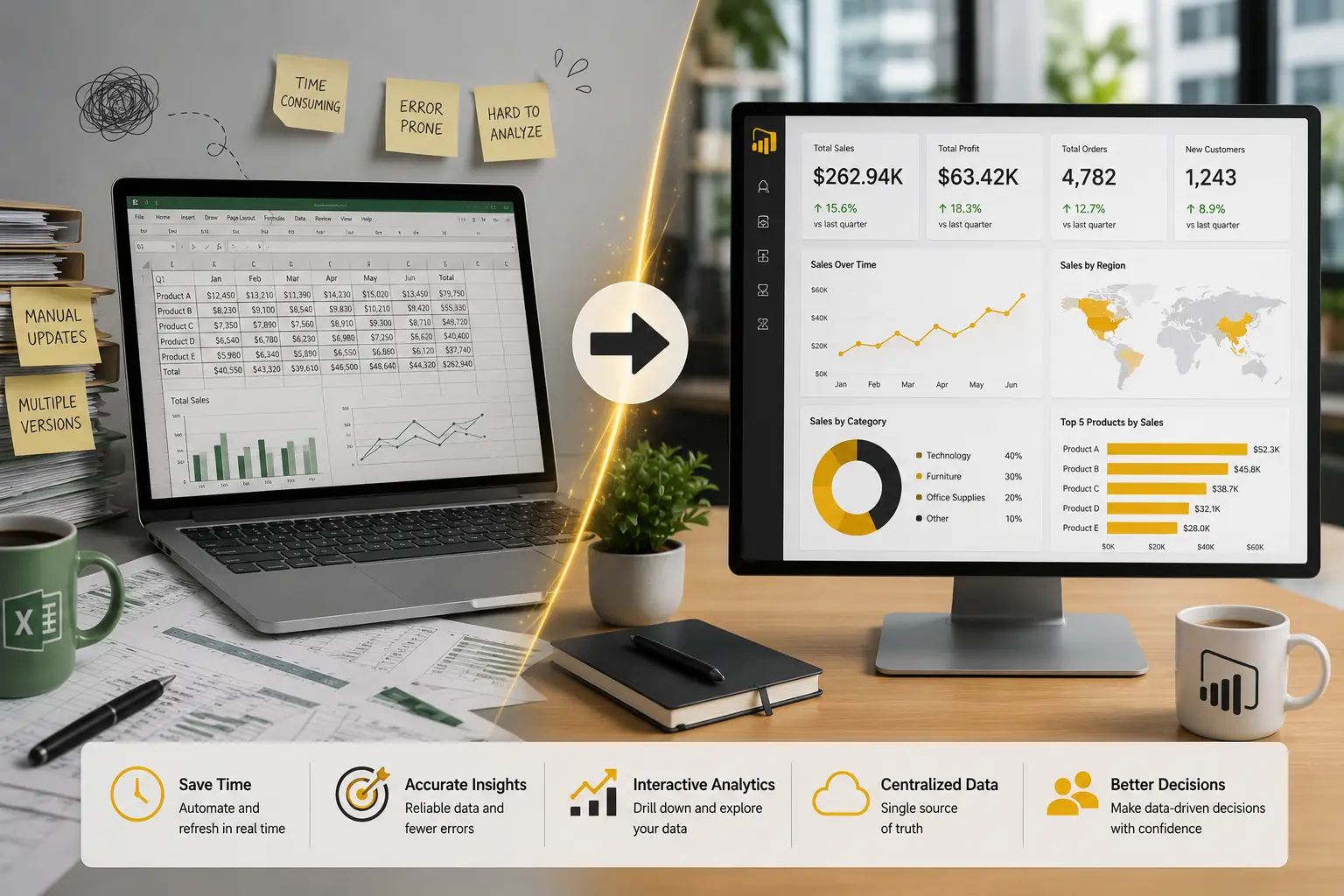
Excel remains one of the most useful business tools ever created. It is excellent for quick analysis, financial modeling, data entry, ad hoc calculations, and flexible spreadsheet work. Many finance and operations teams should continue using Excel where that flexibility is valuable.
Power BI solves a different problem. It is designed for repeatable reporting, interactive dashboards, shared semantic models, scheduled refreshes, security, and distribution. When a report needs to be used by many people on a regular cadence, Power BI is often the better long-term platform.
The issue is not whether Power BI should replace Excel everywhere. It should not. The question is whether the current Excel reporting process has become too manual, too fragile, or too important to depend on copied files and hidden formulas.
Signs your business should upgrade from Excel reporting
Reports take too long to prepare
If analysts spend hours every week exporting data, cleaning columns, updating formulas, refreshing pivots, and emailing files, the reporting process is a candidate for automation.
There are multiple versions of the same report
When different managers maintain their own copies, the business eventually gets conflicting numbers. Power BI can centralize KPI logic in a shared model.
Data comes from several systems
Excel can combine data, but repeated manual merging becomes risky. Power BI, supported by proper data modeling or data engineering, can connect sources more consistently.
Reports need security
If different users should see different regions, locations, departments, or financial details, Power BI security patterns such as workspace permissions and row-level security are more appropriate than spreadsheet distribution.
Leadership needs dashboards instead of files
Executives often need fast access to current KPIs, trends, and exceptions. A Power BI dashboard can reduce dependence on emailed attachments and static monthly packs.
The business needs refresh reliability
Recurring reports should not depend on one person remembering every step. Scheduled refreshes, monitored failures, and documented ownership make reporting more resilient.
Excel vs Power BI comparison
Practical SMB examples
Finance close reporting
A finance team may still use Excel for analysis and adjustments, but Power BI can automate management reporting after the close. The dashboard can show revenue, margin, expense variance, cash, and receivables using consistent definitions.
Sales and pipeline reporting
A sales manager may export CRM data to Excel every Monday. Moving to Power BI can create a refreshed dashboard with pipeline, bookings, win rate, aging opportunities, and rep performance.
Operations reporting
An operations leader may receive separate spreadsheets for tickets, jobs, inventory, and staffing. Power BI can combine the data into a business dashboard that shows service level, backlog, capacity, and exceptions.
If your business is considering this transition, the first step is usually not a flashy dashboard. It is a clear reporting automation plan. Our guides on automated business reporting, data warehouses, and Power BI implementation cost can help frame the decision.
How to move from Excel to Power BI without overbuilding
Start with one reporting process that is painful, recurring, and valuable. Do not try to rebuild every spreadsheet at once. Choose a report where automation would save time, reduce errors, or improve management visibility.
Document the current process. Identify source systems, manual steps, formulas, business rules, users, refresh cadence, and security needs. This helps determine whether Power BI alone is enough or whether the company also needs data engineering.
Then design the model before the visuals. A clean semantic model makes future dashboards easier to build. This is where Power BI consulting can be valuable, especially when the business wants reporting that scales beyond one file.
Ready to move beyond manual Excel reporting?
Willduet helps SMBs replace recurring spreadsheet reports with Power BI dashboards, reporting automation, KPI models, and BI implementation support.
Conclusion: power bi vs excel
Power bi vs excel is not a winner-takes-all decision. Excel is still valuable for flexible analysis and modeling. Power BI is stronger when reporting needs automation, dashboards, shared KPIs, security, refresh reliability, and broader distribution. The right upgrade path keeps Excel where it works and moves recurring business reporting into a more scalable Power BI environment.
Frequently asked questions
Is Power BI better than Excel?
Power BI is better for shared dashboards, automated refresh, governed KPI reporting, security, and interactive analysis. Excel is still useful for ad hoc analysis, modeling, and flexible spreadsheet work.
When should a business move from Excel to Power BI?
Consider moving when reports are manually updated, files are duplicated, leaders debate versions of the truth, data comes from multiple systems, or reporting needs refresh, security, and distribution.
Can Power BI replace Excel completely?
Usually no. Most businesses still use Excel for analysis and planning. Power BI should replace recurring manual reporting where dashboards, models, and automation are a better fit.
Can Power BI connect to Excel files?
Yes. Power BI can use Excel files as a source, although important business reporting often benefits from moving data into more reliable databases, warehouses, or managed sources.
Is Power BI good for executive reporting?
Yes. Power BI works well for executive reporting when KPIs, models, security, refreshes, and dashboard design are implemented carefully.
Should we hire a Power BI consultant for the move from Excel?
A consultant can help when Excel reporting is business-critical, complex, manually refreshed, or spread across departments with inconsistent definitions.